
InfoQ: Announcing Verve – A Type-Safe Operating System
Cool stuff!
The very first activity in the Default Template is named “Get the Build” and is of type Microsoft.TeamFoundation.Build.Workflow.Activities.GetBuildDetail .
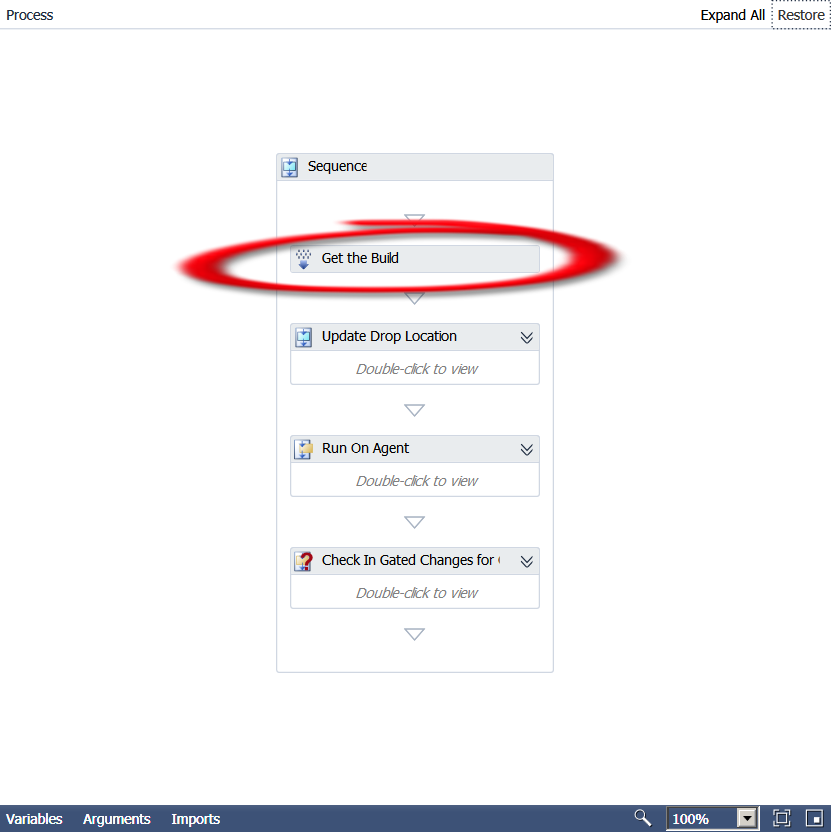
Now unfortunately, Microsoft does not provide any documentation for the above namespace. Sooo, it’s time to break out .Net Reflector!! This is a great tool that allows you to basically get the code or reverse engineer compiled assemblies. So we put the Microsoft.TeamFoundation.Build.Workflow.dll assembly (can be found at C:\Program Files (x86)\Microsoft Visual Studio 10.0\Common7\IDE\PrivateAssemblies) in the tool and here’s what we get:
public sealed class GetBuildDetail : CodeActivity<IBuildDetail>
{
    // Methods
    public GetBuildDetail();
    protected override IBuildDetail Execute(CodeActivityContext context);
}
Interesting… so we know that the Execute method is the one run by the activity and it apparently
returns a IBuildDetail interface. Going to the interface, we find that the only derived type is BuildDetail.
Okay, now we’re getting somewhere. I can tell you from already going all the way through the Default template workflow that the BuildDetail class is very important and used in a lot of other activities. It is basically a container for a whole lot of properties. Here is a list of those properties, so get out your pencils!
public IBuildController BuildController { get; internal set; }
public Uri BuildControllerUri { get; internal set; }
public IBuildDefinition BuildDefinition { get; internal set; }
public Uri BuildDefinitionUri { get; internal set; }
public bool BuildFinished { get; }
public string BuildNumber { get; set; }
public IBuildServer BuildServer { get; set; }
public BuildPhaseStatus CompilationStatus { get; set; }
public string ConfigurationFolderPath { get; }
public string DropLocation { get; set; }
public string DropLocationRoot { get; }
public DateTime FinishTime { get; }
public IBuildInformation Information { get; private set; }
public bool IsDeleted { get; }
public bool KeepForever { get; set; }
public string LabelName { get; set; }
public string LastChangedBy { get; }
public DateTime LastChangedOn { get; }
public string LogLocation { get; set; }
public string ProcessParameters { get; }
public string Quality { get; set; }
public BuildReason Reason { get; }
public string RequestedBy { get; }
public string RequestedFor { get; }
public string ShelvesetName { get; }
public string SourceGetVersion { get; set; }
public DateTime StartTime { get; }
public BuildStatus Status { get; set; }
public string TeamProject { get; }
public BuildPhaseStatus TestStatus { get; set; }
internal VersionControlServer VersionControl { get; }
So, not only are these properties used all over the place, you can use them too! Want to know if the build succeeded?
Put in a If activity and test for
BuildDetail.CompilationStatus = Microsoft.TeamFoundation.Build.Client.BuildPhaseStatus.Succeeded
See how learning the Default template leads you to customization mastery!?! Now go use your new found knowledge and create your own cool customizations!!
When you create a new team project in Team Foundation Server 2010, there is one directory created automatically in the team project’s home in source control: BuildProcessTemplates. In that directory there are 2 – 3 Windows Workflow xaml files depending on if you have Lab Management installed or not. The one that is most used and the one I will concentrate on in the next series of posts is DefaultTemplate.xaml. If you want to really customize your builds, you need to know the Default Template inside out.
The MSDN documentation on the subject is minimal. Ewald Hofman has a great series on the subject here. Really gets into the weeds of how things are done with the new Windows Workflow Foundation team build. Enjoy!
All editions of ASP .Net (1.0 – 4.0) are vulnerable to the “Padding Oracle” crypto attack. Scott Guthrie has a good post about it here. Microsoft has acknowledged the attack and is offering a work around. There is also a post on Microsoft’s Security Research and Defense blog here. Microsoft’s official response shows that they aren’t too happy that the hacker decided to publicly disclose the attack without telling them about it first:
We continue to encourage security researchers to coordinate vulnerability disclosure with software vendors. We believe public disclosure before a comprehensive update can be produced only leads to customer risk through criminal activity.
An actual demostration of the attack on a DotNetNuke installation to become the “SuperUser” took less than five minutes…
DotNetNuke has published their response here.
I’ll be keeping up with this over the weekend. So come back to find out more. I haven’t seen any attacks yet… but that will be when it get interesting….
Type sn -v NameOfAssembly.dll at the command line. It will say “NameOfAssembly.dll is valid” if it is strongly named. It will say “NameOfAssemby.dll does not represent a strongly named assembly” if it is not.
Example:
c:\>sn -v Microsoft.AnalysisServices.AdomdClient.dll
Microsoft (R) .NET Framework Strong Name Utility Version 4.0.30319.1
Copyright (c) Microsoft Corporation. All rights reserved.
Assembly ‘Microsoft.AnalysisServices.AdomdClient.dll’ is valid
It appears, according to this blog post, that the Update just released for Lab Management has many other updates in it around all functions of TFS. One of my clients was experiencing unexpected behavior during merges that this will hopefully address. I would apply it asap.
UPDATE (5/10/2012) This has been solved! (Albeit two years later) Go download SQL Server 2012 Data Tools!
So, you’re migrating to Visual Studio 2010 and you want to open your reporting services projects… Not going to happen!! According to the SQL Server development team, they have heard the suggestion and resolved not to add that feature. So, if heaven forbid, you have a solution that has a reporting services project in it and another type; you will be switching between VS 2008 and VS 2010. The problem stems from the fact that Business Intelligence Development Studio (BIDS) is implemented by the SQL Server team and Visual Studio is in the Developer Tools department. Apparently they don’t talk and the SQL Server team releases BIDS when they feel like and on the version of Visual Studio they feel like.
Maybe they need to change the system?
 Woody Press