MetaProperty is marked as secure error message in MSDeploy


So I was running this command on an IIS 6.0 box:

msdeploy verb:sync -source:webServer60 -dest:package=c:\package.zip

and kept getting this error:

Error: The property ‘value’ located at ‘/webServer60/metaKey[@path=’/LM/W3SVC’]/metaProperty’ is marked as secure. You must specify an encryption password to archive this property.

Since this was a production server setup by someone else, I thought that I had to get the password from them.  NOPE!!!  After an hour of scouring the web to see how even to set this password in IIS 6; a colleague pointed out that it needs the password to encrypt the metabase properties going into the package!!!!

So I could set any password!!! Just have to remember it when I go to deploy that package somewhere else.

Here’s to hoping you find this post before wasting an hour like me! 🙂


An updated Word version of the MSF for CMMI Process Improvement v5.0 Process Guidance


Hi Folks,

This has been a very popular download on the site.  I’m starting to do some more work around the CMMI template, so I thought I’d update the word version.  Much cleaner in the table of contents.  Only thing missing is some info on the dashboard reports, but stubs are there for each one.  Weighs in at 216 pages!  Enjoy!

MSF for CMMI Process Improvement v5 – Process Guidance

Code Reviews


Code reviews are a best practice developed back in the early 1970’s by Michael Fagan.  He was a computer hardware engineer by training and knew from experience that reviews in his previous field found quite a few defects before a hardware spec was sent to the factory to be burned onto silicon.  It was expensive to undo defects once the spec had been sent to the factory and reviews were a great tool in catching defects early.  His original paper describes the “Fagan Inspection”.

As time has gone on, more papers and books have been published on the subject; most notably Handbook of Walkthroughs, Inspections, and Technical Reviews by Daniel Freedman and Gerald Weinberg in 1990.  The best current source for how to do reviews is the IEEE Standard 1028 for Software Reviews and Audits.  Regrettably, the IEEE does not make their standards free to access, which I think diminishes their use and ultimately their importance.  In it they describe four types of reviews: a Management Review, Technical Review, Inspection, and Walkthrough.  I have taken these four descriptions and amalgamated them into a review procedure that, I think, brings the four procedures together nicely.  I post it here for your edification and use.

Code Review Policy & Procedure

This is how you do Network Security


At a client and was trying to get high-speed internet. Did the old “take an ethernet cable from some computer and plug it into mine” routine. Couldn’t access the internet or their network. Good for them.

But the best part is SIX MINUTES LATER, some guy comes in and asks me what I’m doing here. Says he got an alert to his mobile phone that someone on the level tried to gain access to the network. If it was after-hours (thankfully it wasn’t); security would have come. Also, no USB Data sticks work on any of the computers.

I asked him what software they use for this and he said, “I can’t say”.

Very well done sir, very well done.

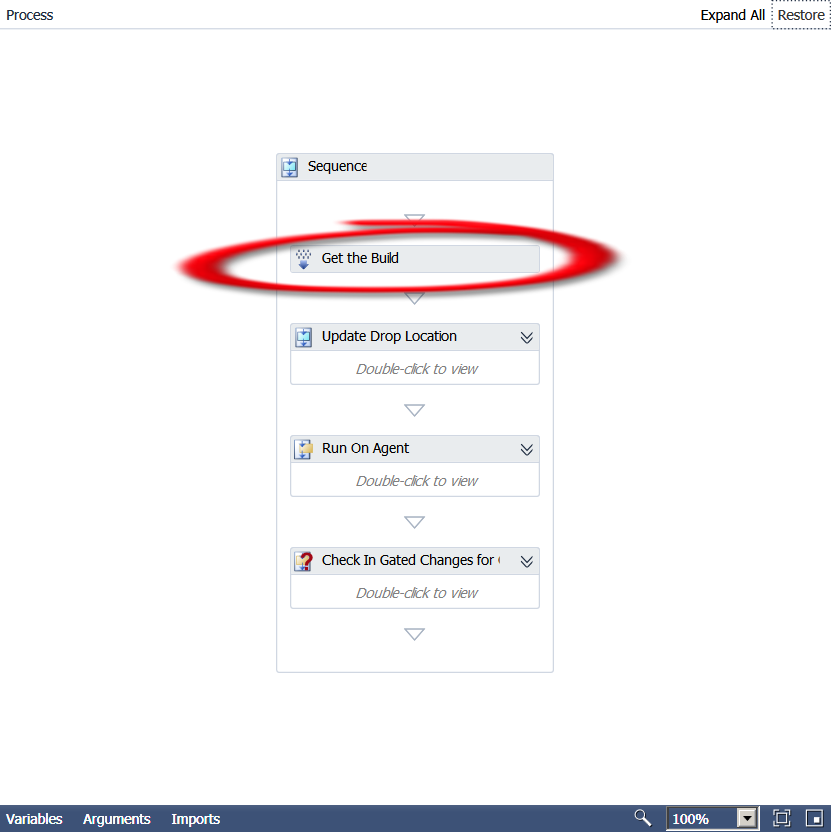
Deconstructing the TFS 2010 Default Build Template Part 1: Get the Build


The very first activity in the Default Template is named “Get the Build” and is of type Microsoft.TeamFoundation.Build.Workflow.Activities.GetBuildDetail .

Now unfortunately, Microsoft does not provide any documentation for the above namespace.  Sooo, it’s time to break out .Net Reflector!!  This is a great tool that allows you to basically get the code or reverse engineer compiled assemblies.  So we put the Microsoft.TeamFoundation.Build.Workflow.dll assembly (can be found at C:\Program Files (x86)\Microsoft Visual Studio 10.0\Common7\IDE\PrivateAssemblies) in the tool and here’s what we get:

public sealed class GetBuildDetail : CodeActivity<IBuildDetail>
{
    // Methods
    public GetBuildDetail();
    protected override IBuildDetail Execute(CodeActivityContext context);
}

Interesting… so we know that the Execute method is the one run by the activity and it apparently
returns a IBuildDetail interface.  Going to the interface, we find that the only derived type is BuildDetail.

Okay, now we’re getting somewhere.  I can tell you from already going all the way through the Default template workflow that the BuildDetail class is very important and used in a lot of other activities.  It is basically a container for a whole lot of properties.  Here is a list of those properties, so get out your pencils!

public IBuildController BuildController { get; internal set; }

public Uri BuildControllerUri { get; internal set; }

public IBuildDefinition BuildDefinition { get; internal set; }

public Uri BuildDefinitionUri { get; internal set; }

public bool BuildFinished { get; }

public string BuildNumber { get; set; }

public IBuildServer BuildServer { get; set; }

public BuildPhaseStatus CompilationStatus { get; set; }

public string ConfigurationFolderPath { get; }

public string DropLocation { get; set; }

public string DropLocationRoot { get; }

public DateTime FinishTime { get; }

public IBuildInformation Information { get; private set; }

public bool IsDeleted { get; }

public bool KeepForever { get; set; }

public string LabelName { get; set; }

public string LastChangedBy { get; }

public DateTime LastChangedOn { get; }

public string LogLocation { get; set; }

public string ProcessParameters { get; }

public string Quality { get; set; }

public BuildReason Reason { get; }

public string RequestedBy { get; }

public string RequestedFor { get; }

public string ShelvesetName { get; }

public string SourceGetVersion { get; set; }

public DateTime StartTime { get; }

public BuildStatus Status { get; set; }

public string TeamProject { get; }

public BuildPhaseStatus TestStatus { get; set; }

public Uri Uri { get; }

internal VersionControlServer VersionControl { get; }

So, not only are these properties used all over the place, you can use them too!  Want to know if the build succeeded?

Put in a If activity and test for

BuildDetail.CompilationStatus = Microsoft.TeamFoundation.Build.Client.BuildPhaseStatus.Succeeded

See how learning the Default template leads you to customization mastery!?!  Now go use your new found knowledge and create your own cool customizations!!